UI/UX Design vs UI/UX Development: What Is the Difference
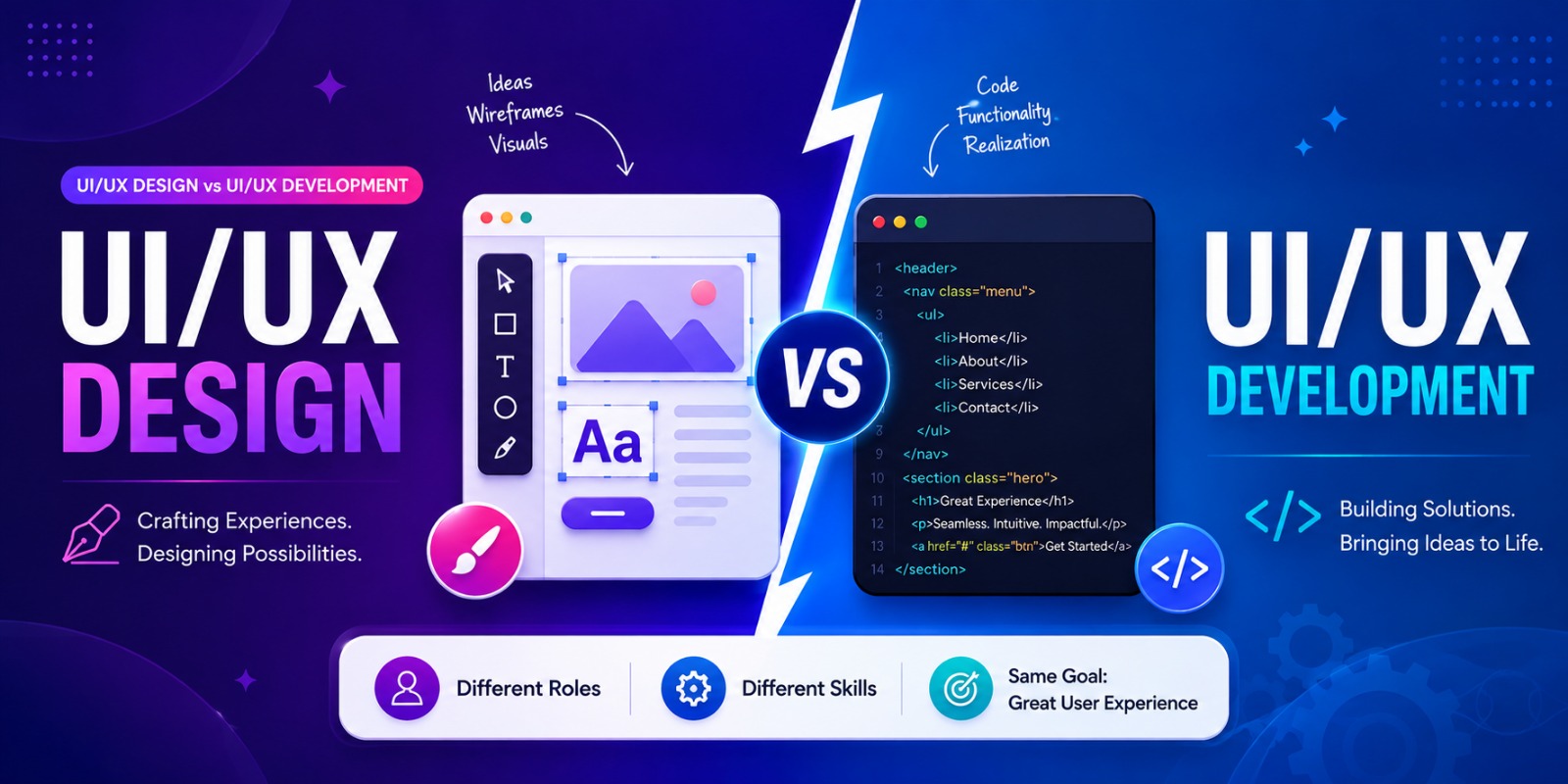
Choosing a career in the digital industry can be challenging when different roles seem to overlap. UI/UX design and UI/UX development are two areas that students often come across when exploring careers in technology. Although both contribute to creating better digital products, their responsibilities and skill requirements are quite different.
UI/UX design focuses primarily on understanding users and creating the visual and interactive experience of a website or application. UI/UX development, on the other hand, involves implementing those designs and turning them into functional digital interfaces.
For students planning to enter the IT industry, understanding these differences can help them identify which area matches their interests, abilities, and career goals.
What Is UI/UX Design?
UI/UX design combines two closely connected disciplines - User Interface design and User Experience design.
The UI design side focuses on the visual appearance of a digital product. Designers decide how screens, buttons, menus, colours, typography, icons, and other interface elements should appear and work together.
The UX design side looks more closely at the user's overall journey. Designers consider whether a website or application is easy to understand, navigate, and use.
A designer may work on:
- Understanding user requirements
- Creating user journeys
- Developing wireframes
- Designing prototypes
- Creating page layouts
- Establishing visual consistency
- Testing interface concepts
- Improving usability
The objective is to create a digital experience that is both visually appealing and convenient for the intended audience.
What Is UI/UX Development?
UI/UX development focuses on bringing interface concepts into a working digital environment.
A developer takes approved designs and implements the visual structure, interactions, and functionality required for users to interact with the product.
Depending on the role, UI/UX development can involve technologies such as HTML, CSS, JavaScript, and other front-end tools.
A developer may be responsible for:
- Building web interfaces from design files
- Creating interactive components
- Making pages responsive
- Implementing animations and interactions
- Improving interface performance
- Testing pages across devices
- Resolving implementation issues
This makes UI/UX development more technically focused than the design process.
What Is the Difference Between UI/UX Design and UI/UX Development?
The easiest way to understand the difference is to look at what each role is responsible for.
Area | UI/UX Designing | UI/UX Development |
|---|---|---|
Main focus | User experience and interface design | Technical implementation |
Primary objective | Plan an intuitive digital experience | Turn the design into a working interface |
Main activities | Research, wireframes, prototypes and visual design | Coding, interaction and responsive implementation |
Key skills | Design thinking, visual design and usability | Front-end development and technical problem-solving |
Common tools | Figma and other design platforms | HTML, CSS, JavaScript and development tools |
Main output | Designs and prototypes | Functional interfaces |
In simple terms, the designer plans the experience, while the developer makes that experience work on a digital platform.
However, the two roles regularly collaborate. A successful website or application requires both good design and effective technical implementation.
What Skills Are Important for UI/UX Design?

Students interested in design need more than an eye for attractive visuals. They also need to understand how people interact with digital products.
User Research
Research helps designers understand the expectations, behaviours, and problems of their target users.
Wireframing
Wireframes provide a basic structure for pages before detailed visual elements are added.
Prototyping
Prototypes help demonstrate how different screens connect and how users may interact with a product.
Visual Design
Students learn about typography, spacing, colours, hierarchy, alignment, and consistency to create effective interfaces.
Usability
A visually attractive website is not necessarily a good website. Designers must ensure that users can complete tasks without unnecessary confusion.
Problem-Solving
Designers frequently need to identify user problems and develop practical solutions that improve the overall experience.
These skills form an important part of UI and UX Design and can help students build a strong foundation for further learning.
What Skills Are Required for UI/UX Development?
UI/UX development requires a stronger technical foundation because developers work with code and digital interfaces.
Important skills include:
HTML and CSS
These technologies help developers structure and style web pages according to the approved design.
JavaScript
JavaScript adds functionality and interactive behaviour to web interfaces.
Responsive Development
Students need to understand how interfaces adapt to different screen sizes and devices.
Front-End Implementation
Developers must be able to translate design elements into usable components while maintaining consistency with the original interface.
Testing and Debugging
Developers review interfaces across different environments, identify technical issues, and refine the implementation.
Developing these abilities can help students move beyond static designs and understand how digital products function in real environments.
Which Tools Are Used in UI/UX Design?
Designers use specialised software to plan and present digital interfaces.
Common activities include:
- Creating wireframes
- Designing screen layouts
- Building interactive prototypes
- Organising design systems
- Preparing visual assets
- Sharing designs with development teams
Tools such as Figma are widely used for interface design and prototyping. Students pursuing a UI/UX Design Course can benefit from learning how these tools fit into the complete design process rather than treating them as isolated software skills.
Can UI/UX Designers Learn Development?
Yes. A student who begins with design can gradually develop technical abilities and understand how their designs are implemented.
Learning basic development concepts can help designers:
- Create more realistic designs
- Communicate better with developers
- Understand technical limitations
- Design interfaces that are easier to implement
- Collaborate more effectively on projects
Similarly, developers can benefit from learning fundamental design principles. Understanding user behaviour and visual hierarchy can help them implement interfaces more effectively.
Students do not necessarily have to become experts in both areas. However, understanding the relationship between them can be a valuable advantage.
Which Path Is Better for Students?
There is no single answer because the right choice depends on individual interests.
UI/UX Designing May Suit You If You Enjoy
- Creative work
- Visual communication
- Understanding user behaviour
- Designing layouts
- Research and problem-solving
- Creating prototypes
UI/UX Development May Suit You If You Enjoy
- Coding
- Technology
- Building interactive interfaces
- Solving technical problems
- Working with web technologies
- Turning designs into working products
Students who enjoy both creativity and technology can explore both areas before deciding where they want to specialise.
How Do Designers and Developers Work Together?
Designing and development are connected stages of the same digital product journey.
A typical process may involve:
Research → Wireframing → Prototyping → Visual Design → Development → Testing → Refinement
The designer begins by understanding the user and planning the experience. Once the interface has been designed, the development team works on implementing it.
During development, some design elements may need technical adjustments. Designers and developers therefore need to communicate regularly to ensure that the final product remains both practical and visually consistent.
This collaboration is particularly important when working on larger websites and applications.
Why Should Students Learn UI/UX Skills?
Digital products are now an important part of everyday life, from websites and e-commerce platforms to mobile applications and online services. Businesses therefore need professionals who understand how to create experiences that are easy to use.
Learning UI/UX skills can help students:
- Understand user-centred design
- Build practical projects
- Develop creative problem-solving abilities
- Create portfolio pieces
- Understand digital product workflows
- Explore design-related technology careers
Students considering UI UX Design Training should therefore look for learning programmes that provide opportunities to apply concepts through practical projects rather than focusing entirely on theory.
How TCP India Supports Practical UI/UX Learning
At TCP India, students in Mehsana, Gujarat, can develop UI/UX knowledge through structured and practical learning. The focus should not be limited to understanding design terminology but should also include applying concepts to real project scenarios.
Through practical activities, students can work on areas such as interface planning, wireframing, prototyping, visual design, and usability. This type of project-based exposure can help students understand how design decisions are made and how digital products are developed.
For students considering UI UX Design Classes, practical experience can also help them create projects that demonstrate their abilities when applying for internships or entry-level opportunities.
Conclusion
Understanding UI/UX design and UI/UX development can help students make a more informed career decision. While design concentrates on users, visual communication, interface structure, and overall experience, development focuses on implementing those ideas as functional digital products.
The two roles are different, but they work closely together. Students interested in creativity may find UI/UX design more suitable, while those who enjoy coding and technology may prefer the development side. Students who enjoy both can gradually build skills across the two areas.
At TCP India in Mehsana, Gujarat, students can explore practical UI/UX learning and develop skills that support their journey into the digital industry. If you are considering a career in this field, choosing the right UI UX Design Training and gaining practical project experience can provide a strong foundation for your future.
Frequently Asked Questions
What is the main difference between UI/UX design and UI/UX development?
UI/UX design focuses on planning the user experience and visual interface, while UI/UX development focuses on implementing those designs as functional digital interfaces.
Does UI/UX development require coding?
Yes. Development roles generally require knowledge of technologies such as HTML, CSS, and JavaScript, although the exact requirements depend on the position.
Is UI/UX design suitable for creative students?
Yes. Students who enjoy visual communication, research, creativity, and solving user problems may find designing a suitable career direction.
Can I learn UI/UX design and development together?
Yes. Students can build a foundation in one area and gradually learn skills from the other. Understanding both can also improve collaboration between designers and developers.
Which is better for a student, designing or development?
Neither is universally better. Students should consider whether they prefer creative and user-focused work or technical and coding-oriented tasks when choosing their direction.
Why is practical training important for UI/UX students?
Practical training allows students to apply design concepts to projects, build confidence, understand real workflows, and develop portfolio work that demonstrates their abilities.
Leave Comments
Recent Post
Essential Database Skills Students Need for a Career in Tech
Sep 29, 2026

Essential Data Analysis Skills Students Need for a Career in Tech
Sep 21, 2026
Essential Skills Students Need to Start a Career in Mobile App Development
Sep 15, 2026
Skills Students Can Build Through MEAN Stack Development
Sep 07, 2026
What Students Can Build with a Python Web Development Course
Aug 24, 2026
Skills Students Build Through a Full Stack Python Developer Course
Aug 18, 2026

What Can You Build with a Full Stack Website Development Course
Aug 05, 2026

How Practical Training Helps You Become a Python Full Stack Developer
Jul 27, 2026